
Walk into any big box store or search online and you’ll find dozens of security cameras at every price point, each one claiming to be the best. The problem isn’t the lack of options. It’s knowing which ones actually do the job for a Toronto home, in a Canadian climate, with your specific layout and entry points in mind.
This guide covers the questions that actually matter for security camera installation in Toronto — resolution, wired versus wireless, storage, what survives a Canadian winter, and why placement and installation quality matter more than almost anything on the spec sheet. It sits alongside our wider range of security services for homes and businesses across the city.
The short version
- Coverage beats count. Decide where cameras go before deciding how many to buy.
- 4K where you need to identify someone — driveways, front entrances. 1080p is fine for a side gate.
- A local NVR with its own hard drive is the safest option for most homes. No subscription, no third party holding your footage, and you can still pull clips remotely through the app.
- Outdoor cameras in Toronto need an IP66 rating or better and a temperature rating to at least −30 °C.
- Water getting into the camera or the cable entry will destroy the camera. That is an installation failure, not a product failure, and it is the most common reason a camera needs replacing early.
How many security cameras does a home actually need?
The count is the wrong starting point. The number of cameras a home needs depends entirely on where its entry points and blind spots are, which is why a site assessment comes before any product recommendation.
The most common mistake homeowners make is deciding how many cameras to buy before working out where those cameras go. A poorly placed 4K camera is less useful than a well-placed 1080p camera. Coverage matters more than count, and coverage starts with understanding how your property is actually laid out.
Entry points, blind spots, lighting conditions, and how your home sits relative to the street and neighbouring properties all determine where cameras belong. That is an assessment, not a product decision. Once you know where the cameras need to go, you choose the right camera for each position.
Is 4K worth it, or is 1080p enough?
4K is worth it where you need to identify a face or read a licence plate — typically driveways and front entrances. 1080p is adequate for closer, narrower views like a side gate. 4K also costs you storage, which is a real budget line, not a footnote.
4K cameras capture significantly more detail, and that matters most when you need to identify a person, read a plate, or get a usable image in low light. For a front driveway or garage entrance, 4K earns its place. For a camera covering a side gate twelve feet away, the difference between 4K and 1080p is far less relevant.
What buying guides tend to leave out is the consequence. 4K produces much larger video files, which means more storage — either a higher cloud subscription tier or, on a local system, a larger hard drive in the NVR. If you specify 4K on every camera and then fit the smallest available drive, you will simply record over your footage faster and may find the clip you need has already gone. The drive has to be sized for the cameras, the frame rate, and how many days of history you want to keep.
The right resolution is the one that matches the job the camera is doing, not the highest number on the box.
Wired or wireless security cameras?
Wired cameras
Wired cameras connect via ethernet or coaxial cable to a central recorder — an NVR (network video recorder) for IP cameras, or a DVR for analogue. They are more reliable, harder to interfere with, and don’t depend on your Wi-Fi signal. Once installed they tend to keep working without much attention.
The tradeoff is the installation itself. Running cables through walls, soffits and exterior surfaces takes time and the right tools, and in an older Toronto home that can be more involved than in a newer build. It is also the part that separates a system that lasts from one that doesn’t.
Wireless cameras
Wireless cameras connect over Wi-Fi and are far easier to install. They are a reasonable solution for renters, for positions where running cable isn’t practical, and for properties where a full wired system isn’t warranted. The limitations are real, though: Wi-Fi signal strength varies, and a wireless camera on the far corner of a property may perform inconsistently. They also depend on battery life or a nearby outlet, and they are more vulnerable to interference than a wired system.
Which is right for a Toronto home?
For most detached homes in the GTA, a professionally installed wired system with a local NVR is the more reliable long-term choice. For condos, townhouses, or situations where full installation isn’t practical, a quality wireless system with a strong router setup is a reasonable alternative. Many properties end up with both — wired cameras on the primary entry points, wireless in secondary positions where cable can’t reasonably be run.
This section covers cameras specifically. For the same wired-versus-wireless question applied to a full alarm and sensor system, see our dedicated guide: wired vs wireless security systems.
Where should footage be stored: the cloud or a local NVR?
For most homes, a local NVR with its own hard drive is the safer option. Your footage stays on your own hardware, there is no subscription, and there is no third-party account to be breached — and you can still view live cameras and pull recorded clips remotely through the app.
This is a decision most buyers don’t think about until after they have chosen the cameras, and it deserves more attention than it gets.
Cloud storage keeps footage off-site, which means it survives if the recorder itself is stolen or damaged. The drawbacks are an ongoing subscription that adds up over the years, pricing you don’t control, and the fact that your footage sits in a third party’s account — which is one more place it can be exposed.
Local storage keeps footage on a hard drive inside an NVR in your own home. No subscription, no third party, and no video leaving your property unless you send it. The common assumption is that this means you can only review footage while standing in front of the recorder, and that is simply not the case: a properly configured system lets you view live cameras and export recorded clips from the NVR’s drive remotely, through the app on your phone, from anywhere.
Two things make a local system work properly. The drive needs to be sized for the number of cameras and the retention you want. And the NVR needs to be somewhere an intruder wouldn’t immediately find it — a recorder sitting in plain sight beside the front door is a single point of failure. Where the system warrants it, local recording can be paired with cloud backup for critical footage, which gives you the reliability of local storage without that single point of failure.
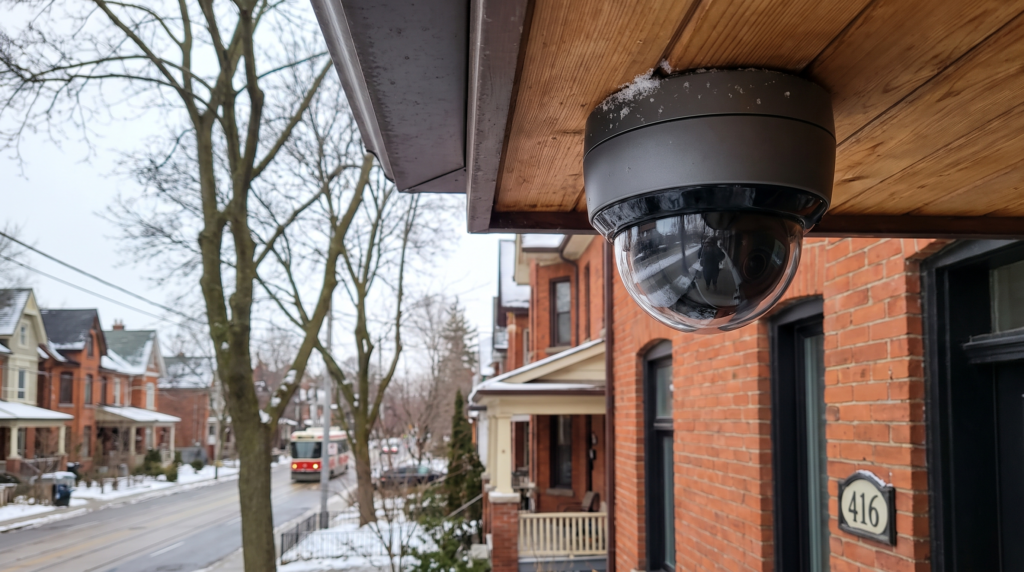
Cable management, weatherproofing and NVR placement are part of the install — and part of whether the system holds up.
What do outdoor cameras need to survive a Toronto winter?
An IP66 rating or better, and an operating temperature range down to at least −30 °C. Just as important, the camera and its cable entry have to be installed and sealed so water cannot get in — water ingress will destroy the camera and it will need replacing.
This is the part that generic buying guides miss, because most of them aren’t written for Canadian homeowners. Toronto winters are hard on electronics. An outdoor camera needs an IP rating of at least IP66 to handle rain, sleet and the wet snow the city gets regularly. Operating temperature matters just as much — a camera rated only to −10 °C won’t survive a January night in Scarborough without degrading. Look for a rating to at least −30 °C for genuine year-round reliability.
The rating on the box only holds if the installation is right. An IP66 camera fitted so that water can track down the cable and into the housing, or with an unsealed penetration through a soffit or wall, will let moisture in. Once water reaches the electronics the camera is finished — it burns out and has to be replaced, and no warranty treats that as a product defect. This is the single most common reason a camera fails early in this climate, and it is entirely avoidable.
Doing it properly means cable runs positioned and sealed so water cannot enter the housing, drip loops where they belong, weatherproof grommets at every penetration, and connections made in enclosures rated for outdoor use. It also means concealed cabling — a run of exposed cable down a brick wall is not just untidy, it is exposed to the weather and to anyone who wants to cut it. Iron Dome holds every install to that standard.
Night vision
Infra-red night vision is standard on most outdoor cameras now, but quality varies widely. Colour night vision, which uses ambient light from street lamps and exterior lighting to produce colour rather than black and white footage, is increasingly worth considering for front-facing cameras in well-lit areas. It makes a real difference to how usable the footage is when you actually need it.
Can outdoor cameras record audio?
Many can. A number of outdoor cameras include a built-in microphone, and some support two-way audio so you can speak through the camera as well as listen. On a driveway or a rear entrance that can add genuinely useful context to footage — a plate you can’t quite read, but a conversation you can hear.
Worth knowing that audio recording is treated differently from video recording under Canadian law, and the rules around recording conversations you are not part of are not the same as the rules for capturing images. If you want microphones enabled outdoors, it is worth raising during the site assessment so the system is set up appropriately for your property.
Are video doorbells worth it for a Toronto home?
Yes, consistently — they are one of the most effective deterrents against package theft and opportunistic break-ins. But a doorbell covers the front door only. The side entrance, garage and backyard still need their own coverage.
Video doorbells have become one of the most effective deterrents for package theft and opportunistic break-ins. A visible doorbell camera at the front entrance changes the calculation for anyone sizing up the property as a target.
The practical value goes beyond deterrence. Two-way audio lets you respond to deliveries when you’re not home. Motion alerts notify you when someone approaches the door before they ring it. For families with older parents or young children, being able to see and speak to whoever is at the door without opening it has everyday value well beyond security.
A video doorbell works best as part of a wider camera and sensor system rather than as a standalone solution.
What does smart home integration add?
Cameras that integrate with smart home systems give you automation that standalone cameras don’t. Motion on the driveway camera triggers exterior lighting. An alert while you’re away lets you check in from your phone and speak through a two-way speaker. Smart integration turns a passive recording system into an active one.
For homeowners who travel, or who have properties they don’t occupy full time, this matters more than it sounds. It closes the gap between something happening and someone actually doing something about it.
Commercial cameras, cabling and networking
Commercial sites need more than more cameras. They need a structured network built to carry them — proper cabling, cable tray or containment, a rack, and a recorder sized for the camera count and the retention period the business actually needs.
Everything above applies to a business too, but a commercial installation is a different job in scale and in kind. A retail unit, warehouse, office floor or multi-tenant building has more cameras, longer cable runs, more people moving through it, and usually a legal or insurance requirement to keep footage for a defined period.
The network is the part that decides whether a commercial system works. Cameras on a commercial site sit on structured cabling, not on Wi-Fi. That means:
- Structured cabling run and terminated properly, tested, and documented so a fault can be found in minutes rather than by guesswork.
- Cable tray and containment. On larger sites we install networking trays to carry cabling cleanly along ceilings and through service areas — supported, accessible, and separated from other services rather than draped over pipework.
- Racks, patch panels and PoE switching sized for the camera count, with room to add cameras later without rebuilding the installation.
- Recorders and storage specified around how many days of footage the business needs to hold, at the resolution and frame rate the cameras are actually running.
Done properly, the same cabling infrastructure carries far more than cameras — access control, door entry, Wi-Fi access points, environmental sensors and the general data network. Building it once, correctly, is significantly cheaper than adding each system on its own cabling over several years.
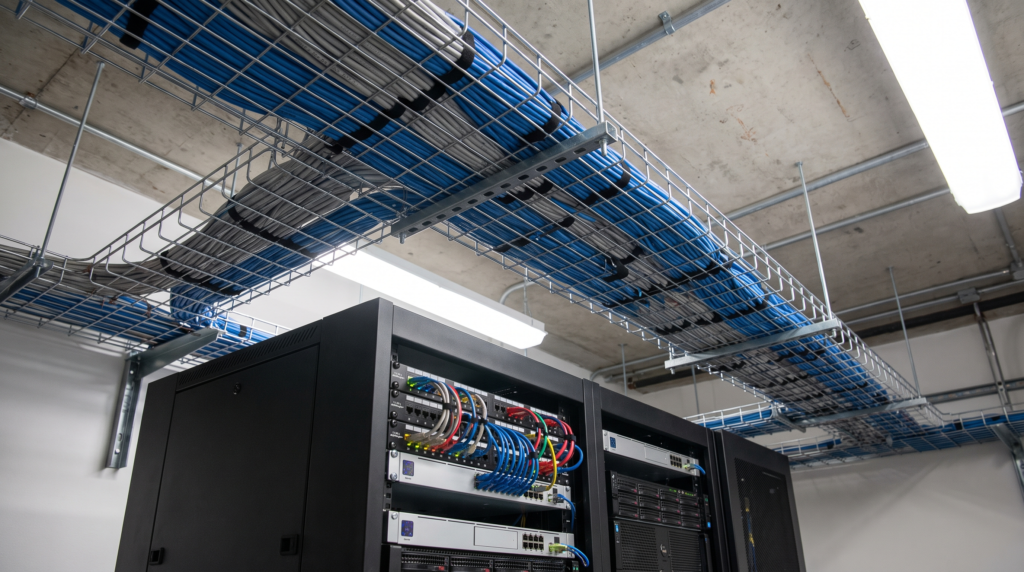
On larger commercial sites, networking trays carry the cabling that the cameras, access control and data network all
depend on.
Why installation matters as much as the camera
The best camera in the wrong position doesn’t protect you. It records what has already happened, in an area that didn’t need covering, while the actual entry point goes unwatched.
Toronto Police Service’s own break and enter prevention guidance notes that most residential break and enters happen during daytime hours, when the homeowner is not home. A system designed around that pattern — cameras covering the real entry points and approaches rather than following a generic template — is fundamentally more effective than one bought off a shelf.
Installation also covers the things that decide whether a system is still working in five years: cable management, weatherproofing, sealed penetrations, NVR placement and sizing, and configuration. Motion zones set correctly. Alerts calibrated. Night vision tested at night, on site, rather than assumed. A camera that alerts every time a car drives past is a camera whose alerts people stop reading.
Getting this right for your property
The right system for a semi-detached in North York is different from the right system for a detached home in Scarborough with a rear garage and a side lane, and both are different again from a commercial unit. There is no universal answer, which is why a site assessment always comes before a recommendation.
We offer a free consultation. We walk the property, identify your actual coverage gaps, and put together a system designed around your home or premises and your risk profile. No generic packages, no upselling — a straight recommendation based on what the property needs. Serving Toronto and the GTA. Read more about Iron Dome.
Common questions
These cover camera systems specifically. For general questions about alarms, monitoring and the rest of what we install, see our full FAQ.
How many security cameras do I need for my house?
It depends on the number of entry points and approaches, not on the size of the house. Most Toronto homes are covered properly by four to eight cameras, but the honest answer is that the figure comes out of a site assessment rather than a price list.
Do security cameras need Wi-Fi?
Wireless cameras do. Wired cameras connect to an NVR by cable and keep recording even if your internet connection drops — you only need the internet to view footage remotely, not to record it.
Is a local NVR safer than cloud storage?
For most homes, yes. Footage stays on your own hardware, there is no third-party account holding your video, and there is no subscription. You can still access it remotely through the app.
Can I see my cameras when I’m not home if I don’t use cloud storage?
Yes. A correctly configured local system lets you view live cameras and export recorded clips from the NVR’s hard drive through the app from anywhere.
What IP rating do outdoor cameras need in Canada?
IP66 at minimum. Just as important is an operating temperature range down to at least −30 °C, and an installation sealed so water cannot reach the camera or the cable entry.
Why did my outdoor camera stop working after one winter?
Most often water ingress, caused by an unsealed cable entry or a housing that wasn’t installed to shed water. Once moisture reaches the electronics the camera has to be replaced. It is an installation problem rather than a product problem.
Do you install security cameras for businesses?
Yes — commercial camera systems, structured cabling, networking, racks and cable tray for larger sites across Toronto and the GTA.
How much does security camera installation cost in Toronto?
It varies with the number of cameras, cable runs, and whether the property is wired or wireless. We quote after a site visit rather than over the phone, so the number reflects the actual job. For a fuller breakdown of what drives the price up or down, see our guide to home security system cost in Toronto.
This article is general guidance for Toronto and GTA property owners. Product specifications, IP ratings and operating temperature ranges vary by manufacturer and model — confirm the ratings on any camera you are considering before buying, particularly for year-round outdoor use.